Architecture
After reading this, you can explain the basic architecture of the fiskaltrust.Middleware and the purpose of a Queue, an SCU, a CashBox and a Launcher.
A fiskaltrust setup consists of three tiers:
- Your POS system
- fiskaltrust.Middleware, which runs your CashBox and provides the service
- fiskaltrust.Portal, which manages your setup
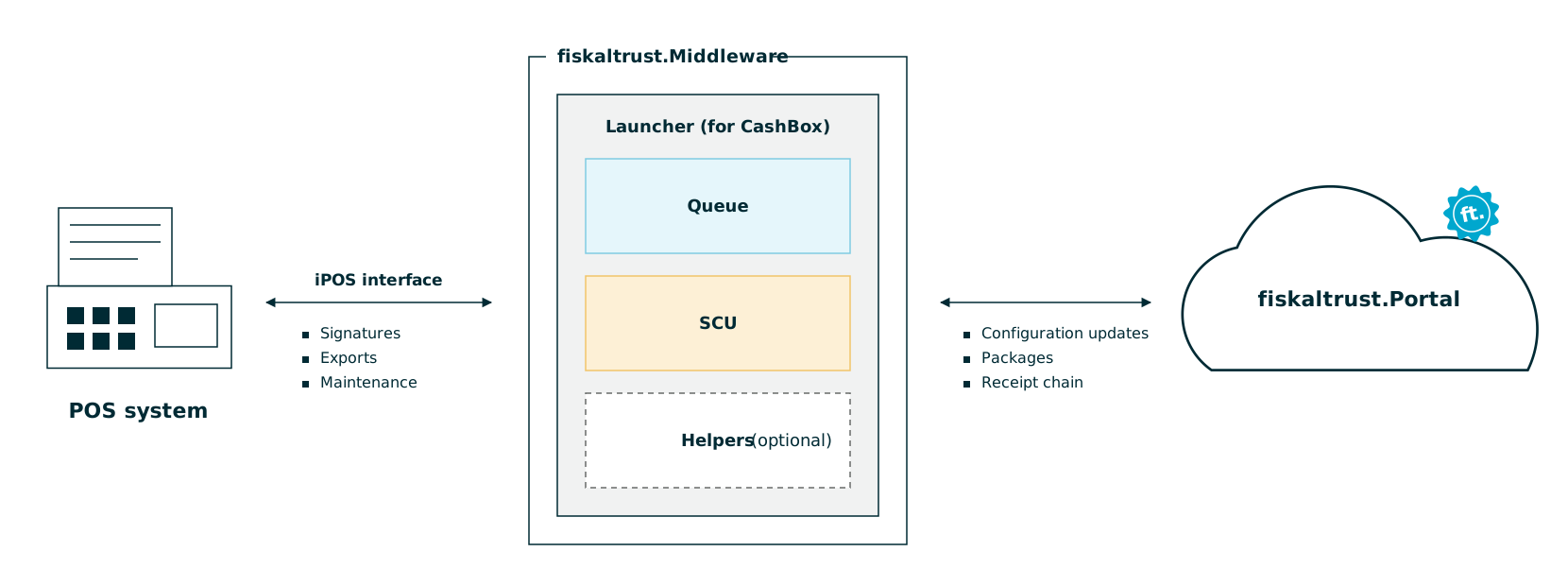
Figure 1. The three tiers of a fiskaltrust setup: POS system, fiskaltrust.Middleware and fiskaltrust.Portal.
The fiskaltrust.Middleware is the autonomous service that provides the core fiscalization functionality:
- Your POS system connects to the Middleware to sign and persist its receipts.
- The Middleware uploads its receipt chain to fiskaltrust.
- The Launcher fetches the CashBox configuration you set in the fiskaltrust.Portal each time the Middleware starts. Configuration changes take effect after a restart.
| Component | Purpose |
|---|---|
| Portal | Management hub for accounts, CashBoxes and updates |
| CashBox | Configuration set of a Middleware instance |
| Launcher | Bootstraps the Middleware instance |
| Queue | Communication interface, receipt datastore and signing requests |
| SCU | Creates the legally compliant receipt signature |
| Helpers | Additional components, for example data upload to fiskaltrust |
Table 1. Components of a fiskaltrust setup.
Portal
The fiskaltrust.Portal is the central management hub. In it, you:
- Control your fiskaltrust account and, subject to their authorization, the accounts of your associated PosOperators.
- Set up and update your Middleware instances (CashBoxes).
The Middleware fetches the CashBox configuration you set in the Portal and uploads its receipt chain to fiskaltrust.
fiskaltrust operates a Portal in each country at https://portal.fiskaltrust.[CCTLD]. For more information, see Countries.
CashBox
The CashBox is the configuration set of a Middleware instance. It contains all details the Middleware needs to run.
- You configure CashBoxes in the fiskaltrust.Portal.
- The Launcher fetches the latest CashBox configuration on each start. If the download fails, it uses the locally cached configuration.
- Configuration changes take effect after the Middleware restarts.
For more information, see CashBox.
Middleware
The Middleware is the fiskaltrust service your POS system uses directly. It is modular: you combine components in a Middleware instance (CashBox) to fit your setup and requirements.
Launcher
The Launcher is the bootstrap component of a Middleware instance. On start, it:
- Downloads the latest CashBox configuration.
- Downloads the required packages and updates itself if a new version is available.
- Starts the configured components.
| Launcher | Use case |
|---|---|
| Desktop Launchers | On-premise installation on Windows, Linux and macOS |
| Android Launcher | On-premise installation on Android |
| Custom data center (Helm chart) | Germany: Bring your own data center product, in Kubernetes clusters |
Table 2. Launcher types.
- Austria and France continue to use Middleware version 1.2. A unified version for all markets is in development.
- The desktop Launcher 2.0 is a release candidate. A migration path from Launcher 1.3 is described in the middleware-launcher repository.
Wherever legally possible, fiskaltrust also offers a fully cloud-based, hosted Middleware. For more information, see CloudCashbox.
Queue
The Queue is the central component of your fiskaltrust setup. It:
- Provides the communication interface (gRPC, REST or SOAP) for your POS system.
- Manages the receipt datastore.
- Handles the signing requests from your POS system.
SCU
The Signature Creation Unit (SCU) supports the Queue. It provides the Queue with the legally compliant receipt signature required by national regulations.
Depending on your market's regulations, the SCU may require an additional SSCD. Typically, an externally attached hardware dongle or a third-party SaaS platform provides the signature to the SCU.
Helpers
Depending on the use case, you can configure helper components in addition to Queues and SCUs. The Helipad helper is deployed by default and uploads the Middleware's Queue and SCU data to fiskaltrust. For more information, see Helper.